

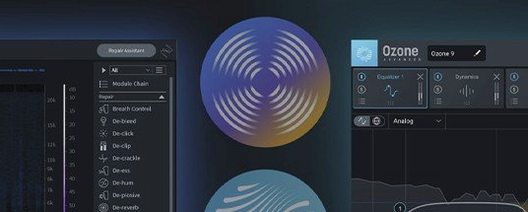
iZotope RX 12.1.0 Mac
Version 12.0.0 arrives with a new Scene Rebalance module that can separate dialogue, music, and effects within a mixed file. The update also introduces Stems View for applying the toolkit to isolated stems and rebuilds the De-bleed and Breath Control processors.
macOS 14.7 Sonoma floor for Intel and Apple silicon
RX 12 requires macOS 14.7 Sonoma or later and runs on both Intel Macs and Apple silicon Macs, supporting native mode as well as Rosetta for older plug-in hosts.
What the repair toolkit covers
The suite bundles application modules and plug-ins for hum, clipping, and broadband noise, alongside machine-learning tools like Dialogue Isolate, Music Rebalance, and Voice De-noise that analyze audio and suggest fixes.
Stems View and Breath Control tighten dialogue edits
You can run RX as a standalone application or load its modules inside a DAW. Stems View and the rebuilt Breath Control module give editors more precise control when cleaning dialogue-heavy projects.
Clean lav rustle, drone, and mouth clicks in under a minute
Dialogue editors working in film and television tend to see the fastest payoff. A single clip with lavalier rustle, an air-conditioner drone, and a few sharp mouth clicks can be cleaned in under a minute without leaving the application. Post-production houses that handle documentary audio lean on the Dialogue Isolate and De-reverb modules heavily when location sound arrives in rough shape, especially for interviews recorded in untreated rooms.
Podcast producers who edit their own shows benefit from the Repair Assistant and the rebuilt Breath Control. Instead of manually attenuating every inhale between sentences, they set a target reduction and let the module handle the rest. The time saved adds up quickly across a season of weekly episodes.
Music producers and sample-library curators use a narrower slice of the suite but value it just as much. De-click and De-crackle are staples for vinyl transfers, while De-clip can rescue a otherwise solid vocal take that hit the converter a little too hard. The new Stems View makes it practical to isolate a bass stem, clean string squeaks, and recombine without bouncing between separate projects.
Game audio designers often reach for Spectral De-noise when cleaning field recordings of footsteps, cloth movement, or ambient backgrounds. Being able to capture usable material in less-than-ideal conditions—near a highway or under a flight path—means fewer trips back to the location.
Double-click a module name to expand it instantly
Several workflow shortcuts hide in plain sight. In the standalone application, double-clicking a module name in the chain list expands it instantly; right-clicking any processed region offers a "Copy settings to all selected" command that applies the same repair to multiple clips in one move. The Repair Assistant can be invoked with Cmd-Shift-R by default, skipping the menu entirely.
Stems View includes a solo button next to each stem that mutes everything else without changing the routing. That is handy when you want to audition only the music stem before sending it to Music Rebalance. The Trim Silence module operates non-destructively until you commit the edit, so testing different threshold and minimum-duration values costs nothing.
The spectral display supports a click-and-drag lasso for selecting arbitrary frequency ranges. Holding Option while dragging subtracts from an existing selection, which helps when isolating a cough that sits right above dialogue fundamentals. Many editors miss that the gain tool inside the Spectral Editor works with scroll-wheel adjustments for fine-tuned amplitude changes.
Handles file repair and batch processing, not multi-track recording
Does RX 12 replace a DAW, or do I still need one? The standalone application handles file-based repair and batch processing well, but it does not record or arrange multi-track projects. Most users keep their preferred DAW and open RX either as a standalone editor or through the AAX, AU, or VST3 plug-ins.
Will it run smoothly on an older Intel Mac? The minimum requirement is macOS 14.7 Sonoma, so machines that cannot update to that release are out of luck. On supported Intel hardware, processing speed depends on the module. Spectral De-noise and Dialogue Isolate lean more heavily on the CPU than De-click or De-hum, but offline rendering in a DAW makes real-time performance less critical for most tasks.
Can I use the plug-ins without the standalone app? Yes. The installer places all the included plug-in formats—AU, AAX, AAX Audiosuite, VST3, and the ARA versions—so you can load them inside a compatible host and never open the standalone application if that suits your workflow.
Does version 12 break compatibility with older sessions? Projects that reference earlier versions of RX plug-ins typically open without issues, though module settings saved in previous major versions may not translate perfectly if the underlying algorithm changed. The rebuilt De-bleed and Breath Control processors, for example, expose different parameters than their predecessors, so re-checking those settings after upgrading is sensible.
Plugin validation fails in Logic or Pro Tools after install
One recurring headache involves plug-in validation failures after installation. Hosts like Logic Pro or Pro Tools may flag new RX plug-ins during their startup scan. The usual fix is to fully shut down the host, restart the Mac, and let the validation run again before opening any session. If a specific format refuses to validate, reinstalling only that plug-in format from the package often resolves it.
Some users report that the standalone application opens with a blank, unresponsive window on first launch. Granting the app permission to access the microphone under System Settings > Privacy & Security > Microphone clears this up, even when no recording is intended—the application requests audio input access to initialize its engine.
Stems View can feel sluggish with files longer than 90 minutes. Splitting the project into smaller chunks before separating stems keeps the interface responsive and reduces the chance of a separation stalling partway through. Saving the project before running Scene Rebalance or Dialogue Isolate on a full-length feature avoids losing work if the analysis times out.
A less obvious pitfall: De-bleed works best when the source that bled into the target track is available on a separate, synchronized track. Feeding it only the contaminated track without a reference often produces artefacts in the upper midrange. Providing a clean bleed-source track—even a rough one—improves the result dramatically.
Switch offline render quality from Standard to High
The default processing quality for several modules is set to "Standard" to keep real-time previews light. Switching the global quality preference to "High" for offline renders is worth doing before processing anything destined for final output. The setting lives under Preferences > Processing and applies to all modules that support quality tiers.
In the Spectral Editor, enabling "Show tonal markers" overlays faint guides on the display that make it easier to distinguish harmonic content from noise when painting out unwanted sounds. The default color map is "Ice," but switching to "Fire" improves contrast on bright displays and makes low-level noise more visible during surgical edits.
For podcast and voiceover work, adjusting Breath Control's target reduction to -12 dB instead of the default -18 dB produces a more natural result for most spoken-word material. The difference is subtle but avoids the slightly choked sound that can appear when breaths are pushed too far down in the mix.
iZotope has posted the official release notes for RX 12 Audio Editor Advanced, version 12.1.0, with its latest round of fixes and performance improvements.
- macOS 14.7 or later
- Apple Silicon or Intel 64-bit Mac
- Version
- 12.1.0
- Download
- 3.6 GB
- Developer
- iZotope
- Languages
- English
- Activation
- K'ed by iamdumb
- Compatibility
- macOS 14.7 or later
- Architecture
- Apple Silicon, Intel 64-bit
Questions readers asked
Yes, it runs natively on Apple silicon Macs and also supports Intel Macs, with Rosetta available for hosts that need it.
Scene Rebalance is a new module that separates dialogue, music, and effects within a mixed audio file.
Yes, the package works as a standalone application and as a set of plug-ins you can load in any compatible DAW on macOS 14.7 or later.
Sign in or open a desk account to write a letter.
No letters on this brief yet. They are read before they run.





 Top
Top