

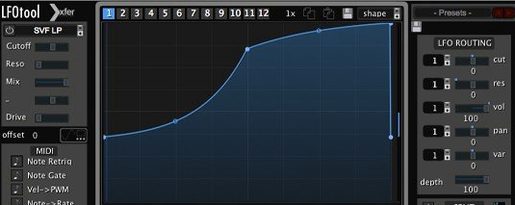
LFOTool 1.768 Mac
The 12-graph preset system is where LFOTool moves from a simple utility to a precision modulator. A single preset can store a dozen distinct LFO shapes, recalled instantly via MIDI notes or host automation, turning a static filter sweep into a sequenced modulation pattern without touching another plug-in.
| Key Detail | Specification |
|---|---|
| Developer | Xfer Records |
| Version | 1.768 |
| Format | VST, AudioUnit |
| macOS | 10.11 and later |
| Architecture | Intel & Apple Silicon |
Loading the plug-in inside any compatible host gives you two parallel signal paths: audio processing and a MIDI output stream. On the audio side, up to four graphs can run simultaneously, each assigned to parameters like cutoff, resonance, or pan. The rate control works in hertz for free-running modulation or locked to the host tempo with an optional swing setting. Sample-accurate sync keeps the waveforms tight against the grid, which matters when you are using it for sidechain-compressor pumping simulations where even a few samples of drift flatten the effect. The MIDI stream opens a different set of possibilities, routing envelope shapes to hardware synthesizers or other virtual instruments as CC messages. Dozens of factory presets cover the obvious ground — AutoPan, tremolo, trance-gate patterns, and autofilter wobbles — but the 12-slot graph switching tends to reward users who build their own modulation sets from scratch.
Building a Sidechain Pump Without a Compressor
Open a four-on-the-floor project where the kick and bass are fighting for the same low-end space. Insert LFOTool on the bass track, pull up an empty preset, and switch to the first graph slot. Draw a curve that starts at 100% amplitude, dips sharply to about 40% over the first eighth-note, then rises back to full by the quarter-note mark. Set the rate to quarter-note BPM sync. Assign the graph to volume. The bass now ducks exactly when the kick hits, no compressor sidechain routing, no latency from lookahead buffers, and the release shape follows the curve you drew rather than a fixed time constant.
Add a second graph on the same preset, assigned to a high-pass filter cutoff. Shape it identically to the first but with a slightly faster decay, so the bass loses its sub frequencies a few milliseconds before the volume drops. The result is a cleaner duck that does not muddy the transient of the kick. Save the preset, then copy it to a third graph slot with a variation that holds the dip for a dotted eighth-note pattern. Switch between them during the breakdown and drop sections using MIDI notes from a silent MIDI track feeding the plug-in. The whole setup takes less than five minutes and the modulation stays sample-accurate regardless of buffer size.
Auditioning TranceGate 02 on a Synth Bus
A typical session starts with LFOTool sitting in the first insert slot of a synth bus. You drag in a preset called something like "TranceGate 02" from the factory bank, audition it against the current arrangement, and immediately notice the gate rhythm clashes with the hi-hat pattern. You open the curve editor, grab the third point in the envelope, and pull it left by a 32nd-note. The gate tightens up. You then enable a second graph and assign it to pan, drawing a slow sine shape that sweeps the gated signal across the stereo field over two bars.
By mid-session, you have three instances running: one on the bass doing volume ducking, one on a pad doing a slow autofilter wobble with a custom triangle wave you built by pulling tension handles on three points, and one generating MIDI CC 11 messages to an external analog synth whose expression pedal input responds to the LFO shape. You spend fifteen minutes dialing swing on the bass ducking rate to push it slightly behind the beat, giving the track a looser feel. The CPU meter barely moves — the C++ foundation keeps each instance light, even with four graphs active.
The render stage approaches. You bounce the bass track with LFOTool printed, then realize the ducking shape feels too deep for the outro. Instead of re-rendering, you automate a graph switch to a shallower curve for the final eight bars. The host automation lane snaps the change instantly, sample-accurate, and the render completes without an extra bounce pass.
First Days: Five Things to Set Up Immediately
The plug-in rewards early configuration. Start by creating a dedicated MIDI track in your template that routes to LFOTool's MIDI input — this is how you will switch between the 12 graphs in a preset, and having it ready avoids breaking flow later. Pick the five factory presets closest to your genre and copy them to a user folder, renaming them with a consistent prefix so they surface first in the host browser.
Spend an hour building one preset from scratch with four graphs assigned to the parameters you modulate most often: volume, filter cutoff, resonance, and pan. Save it as a "blank slate" default that you can adapt quickly. Map the graph switch parameter to a macro knob on your MIDI controller so you can cycle through curves while playing — this turns the plug-in into a performance tool rather than a set-and-forget insert. Finally, test the MIDI CC output into a free software synth to confirm the routing works before you need it on a deadline.
One early gotcha: the hertz-based rate mode does not follow tempo changes unless you automate it manually. If your project shifts BPM mid-song, stick to BPM sync with the swing knob for groove, and reserve hertz mode for sound-design drones where tempo is irrelevant.
How LFOTool Stacks Up Against Similar Modulators
Cableguys MidiShaper operates in a similar lane, generating MIDI CC data from drawn curves, and its waveform editing feels more fluid with fewer clicks. But MidiShaper does not process audio at all — it is strictly a MIDI output device. If you need volume ducking or autofilter effects on an audio track, you need a second plug-in downstream. LFOTool handles both jobs in one slot, and the ability to run four graphs simultaneously gives it an edge for layered modulation.
Kilohearts Snap Heap with the LFO module offers a modular approach, letting you chain multiple modulators and effects in any order. The curve editor is simpler, and the ecosystem of snapins covers ground LFOTool does not, like distortion and delay. The trade-off is precision: the point-and-tension editor in LFOTool allows finer control over curvature, and the 12-graph preset switching via MIDI is absent from Snap Heap's workflow without extensive automation mapping.
MeldaProduction MCCGenerator focuses purely on MIDI CC output with deep routing options and a large modulation matrix, and it supports polyphonic aftertouch and pitch bend messages that LFOTool does not generate. But it lacks the audio-processing signal path entirely, and its interface density requires more clicks to achieve a simple volume duck. For producers who want one plug-in that covers both audio tremolo effects and external synth modulation without leaving the insert slot, LFOTool remains the tighter package. Users searching for an lfo tool free download mac often find themselves comparing these four names, though each occupies a distinct corner of the modulation landscape.
- macOS 10.11 or later
- Intel or Apple Silicon processor
- VST or AudioUnit-compatible host application
- Version
- 1.768
- Download
- 7 MB
- Developer
- xferrecords
- Languages
- English
- Activation
- Included
- Compatibility
- OS X 10.11 or later
- Architecture
- Apple Silicon, Intel 64-bit
Questions readers asked
Yes, the plug-in generates a MIDI message stream that can be routed to hardware instruments and other software, letting you use its LFO shapes as a modulation source.
Sign in or open a desk account to write a letter.
No letters on this brief yet. They are read before they run.




 Top
Top