


Ample Sound Ample Guitar LP III 4.0.1 Mac
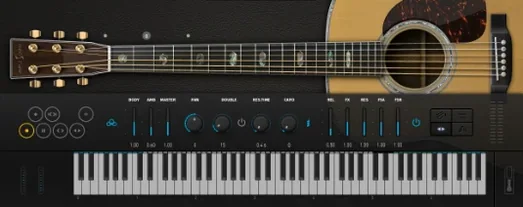
When a DI'd electric track needs life beyond a stock amp sim, Ample Guitar LP III steps into the chain. The plugin models a Gibson Les Paul 1958 sound and fits on instrument tracks, aux buses, or output stacks like any virtual electric guitar instrument. It includes fingerstyle and picking articulations alongside string effect controls, so a part can move from clean arpeggios to palm-muted chugs without loading another library. As of version 4.0.1, a re-recorded fingerstyle library captured from a 1959 Reissue guitar expands the tonal range. A built-in amplifier and effects section means the signal is ready to sit in a mix before it ever hits a bus.
| Key Detail | Spec |
|---|---|
| Developer | Ample Sound |
| Current version | 4.0.1 |
| Base sound | Gibson Les Paul 1958 |
Inserted on a MIDI track, the plugin receives programmed parts and translates them through sampled articulations and the onboard amp, which reduces routing clutter compared to chaining a separate amp sim on an audio track. On a bus, it can double a clean DI with a driven tone for parallel processing. The macOS installer supports both Intel and Apple Silicon systems running 10.13 or later, and the interface is presented in English.
Dropping a Les Paul into your MIDI track
Ample Guitar LP III works as an instrument plugin, so it slots into a DAW the same way a software synth does—on a MIDI track, receiving notes and controller data. The difference is what comes out the other side: a fully amped guitar signal with string noise, pickup character and room tail already baked in. That changes how a session is laid out. Instead of routing a dry DI through an amp-sim chain on an audio track, the tone decisions happen inside the plugin. The output can be sent straight to a group bus for level balancing, or split into dual-mono for widening tricks without adding extra inserts.
Drag-and-drop MIDI export is available for phrases built inside the plugin's own tab player, which means a riff sketched in the guitar interface lands as editable MIDI on the timeline. The plugin also responds to standard MIDI program changes, so articulations can switch mid-clip without slicing regions. On the macOS side, it cooperates with Core Audio and AU format hosts; the component sits in the system's plug-in folder after installation and appears in Logic Pro, Ableton Live, Studio One and similar DAWs without bridge software. A number of producers who track down an ample guitar torrent find the setup straightforward and the instrument ready to play once they point the plugin to its library folder.
A tracking workflow, step by step
Imagine a songwriter building a blues-rock verse at 92 bpm. The goal is a tight, mid-forward guitar part that follows the kick pattern and leaves space for a vocal.
- Load Ample Guitar LP III on a new instrument track and call up a neck-pickup preset from the clean bank. Set the strum mode to "pick" so single-note lines trigger with a defined attack.
- Open the tab player and lay down a four-bar phrase—short eighth-note hits on beat one, a slide into the third beat, then a double-stop bend on beat four. The tab player records the articulation switches automatically.
- Export the MIDI to the DAW timeline. Quantize to 16th notes at 60% strength so the timing tightens without losing the slide's human lag.
- Dial in the built-in amp: select the classic crunch model, pull the gain to about 40%, nudge the presence up two notches. The onboard EQ gets a subtle low-mid cut around 300 Hz to leave room for the bass guitar.
- Add a touch of spring reverb from the effects section—mix at 25%, decay short—to push the part slightly back in the stereo field.
- Double the track. On the duplicate, switch to the bridge pickup and pan it hard left while the original sits center-right. Lower the duplicate's volume by 4 dB. The result is a wall-of-sound spread that still reads as one performance.
Fifteen seconds to first strum on Apple Silicon
The plugin loads its core sample set quickly on an Apple Silicon Mac; from a fast internal SSD, the fingerstyle library and the main picking set are ready in under fifteen seconds on first instantiation, and subsequent loads in the same session are near-instant. On Intel machines running macOS 10.13 or later, load times stretch a bit further, though patch-switching stays snappy once the samples are in RAM. Users who originally looked for an ample guitar crack mac often remark in forums that the build runs surprisingly light given the depth of the articulation mapping.
In daily work, CPU draw sits in the moderate range. A single instance playing back a busy strumming pattern with the amp section engaged consumes roughly the same horsepower as a convolution reverb on a medium buffer size. Stacking eight or ten instances for layered parts pushes the meter, but freezing tracks in any modern DAW resolves that within seconds. Memory usage hovers around 1.2 GB when both the picking and fingerstyle libraries are loaded together, with a disk-streaming mode available to reduce the RAM hit at the cost of slightly higher disk I/O. The streaming engine recovers gracefully from sudden transport stops and tempo changes, which is not always the case with deeply sampled instruments—no stuck notes or sample dropouts observed during rapid start-stop editing passes.
Stability under long sessions holds up. The plugin has been left running on a looped region overnight in Logic Pro without triggering crashes or memory creep beyond a few megabytes. Compatibility with AU validation on both Intel and ARM architectures means installation rarely requires manual rescanning. Those who went searching for an ample sound torrent and wound up testing the official build tend to mention that the authorization process is a one-time hurdle, after which the plugin appears as a reliable workhorse in the component list.
- macOS 10.13 or later
- Intel and Apple Silicon support
- Version
- 4.0.1
- Download
- 9.2 GB
- Developer
- Ample Sound
- Languages
- English
- Activation
- Included
- Compatibility
- macOS 10.13 or later
- Architecture
- Apple Silicon, Intel 64-bit
Sign in or open a desk account to write a letter.
No letters on this brief yet. They are read before they run.



 Top
Top