


Neural DSP Archetype Petrucci 1.0.0 Mac
The Transpose control is where the practical side of the plugin shows itself. Drop the pitch a few semitones and a standard-tuned guitar sits under a vocal without retuning the instrument. Neural DSP Technologies built this into version 1.0.0 of Archetype Petrucci, released for macOS and Windows.
Mid-forward amp and tap-tempo delay anchor a mix
- The amp section pushes midrange forward, which helps a rhythm part hold its place against cymbals and synths.
- A delay with tap tempo lets you set repeats to the song instead of guessing milliseconds.
- The reverb can be kept short enough to add room without washing out note definition.
- A compressor block before the amp smooths pick attack for cleaner double-tracking.
Apple Silicon-native plugin loads in every major Mac format
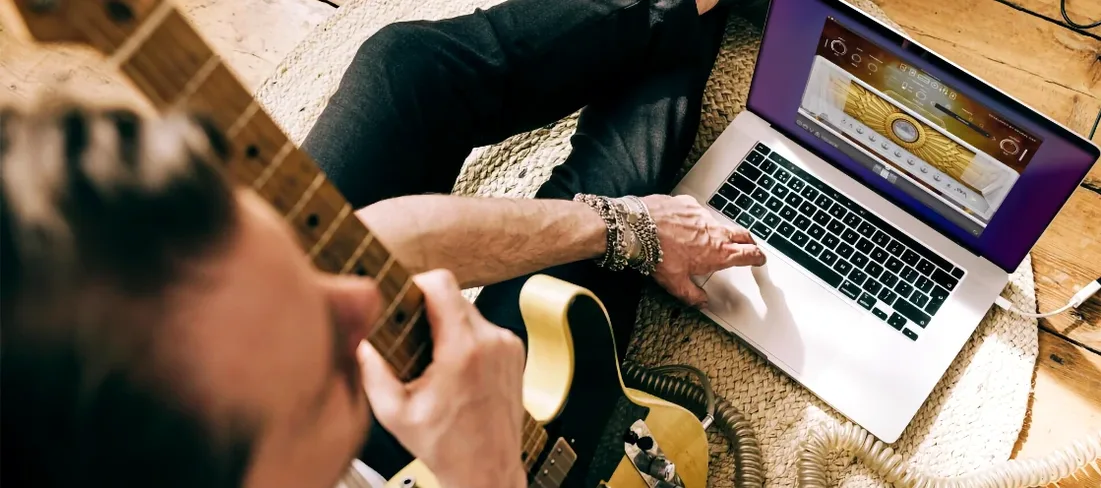
As part of the Archetype series, the plugin loads in 64-bit VST2, VST3, AU, and AAX formats, with standalone use also available. Native Apple Silicon support means the processing runs without a Rosetta translation layer on newer Macs. The developer lists Quad Cortex and Quad Cortex mini compatibility, so presets can move between the desktop plugin and the floor unit.
Drop it on a familiar DI track and finish a tone in one sitting
A new amp plugin can sit unused for weeks if you don’t give it a job right away. In the first session, load Archetype Petrucci on a DI track you already know well — something you’ve tracked with hardware or another plugin. Dial the gain lower than you think you need. The amp models compress more at higher settings, and the midrange character gets pushy fast. Set the output somewhere around -12 dBFS and play for ten minutes without touching a knob. That lets your ears reset their baseline.
Day two is for the cab section. Swap through the impulse responses while a loop plays. The microphone choices shift the high end more than the low end, so listen to how the pick chirp changes before worrying about the body of the tone. If you track with a bright guitar, the ribbon mic option tames the attack without dulling the note separation.
By day three you want a preset that works for double-tracking. Save one rhythm tone with the compressor block active and the delay turned off. Pan it hard left, then duplicate the track, switch the cab IR to the second mic option, and pan hard right. The difference in the two impulses creates the width; you don’t need to change the amp settings. This is the fastest way to hear whether the plugin fits your mixes.
Tighter lows and clearer note attack than a British-voiced rival
Set next to a well-known British-voiced suite, Archetype Petrucci sounds tighter in the low end and less saturated in the gain structure. Where that competitor leans on power-amp compression for thickness, the Neural DSP plugin keeps the note attack defined even at high gain. For palm-muted riffing, the difference is immediate: the chugs stay separate instead of blurring into a single hum. Clean tones on the British suite feel softer and rounder; here they’re glassy and articulate, which suits fingerstyle parts and complex chord voicings.
Against an American high-gain favourite often found in metal productions, the Petrucci plugin pulls back on low-end bloom. The American model gives you a huge bottom that fills a mix quickly but can force you into high-pass filtering to make room for bass guitar. Archetype Petrucci’s low end is shaped higher up, around the low-mids, so it slots into a busy arrangement with less EQ work. The trade-off is that it won’t flatter a thin-sounding guitar the way the American model does — you hear the instrument you plugged in.
A third plugin, popular in the amp-sim community since its early access days, offers more amp models and effects but demands more CPU per instance. On an M1 Mac, running four instances of that plugin can trigger buffer underruns at a 64-sample buffer. Archetype Petrucci, with Native Apple Silicon support, runs leaner. You can stack rhythm and lead instances without freezing tracks as early in the session. The other plugin’s interface is flashier; this one stays utilitarian, which means less scrolling when you’re tracking.
A tracking session from start to finish
You open a project at 9 a.m. with a DI guitar track recorded the night before. The player used a humbucker-equipped guitar, standard tuning. You insert Archetype Petrucci on the track via AU format in Logic Pro. The plugin loads in under two seconds — no authorization splash, no background service to wait for.
You start with the default preset and immediately pull the gain back to 4. The amp model you pick is the second channel, which reacts to picking dynamics more than the higher-gain option. You tap the tempo at 130 bpm and set the delay to a dotted eighth, mix at 25 percent. That’s enough to give the riff movement without the repeats stepping on the snare hits. The reverb stays at a short room setting, decay under one second.
The bass guitar, a separate DI track, is running through a different amp sim. You notice the low end of the guitar competing around 200 Hz, so you reach for the plugin’s built-in EQ — not a separate insert. A narrow cut of 3 dB at 200 Hz on the guitar track clears the space. No third-party EQ needed. You save the preset as “Rhythm – Dotted 8th” and move to the next section.
For the lead part, you duplicate the track, switch to the higher-gain amp model, and activate the compressor block before the amp. The compressor tightens the attack so legato lines don’t drop in volume. You add a longer delay, tap-tempo’d to quarter notes, and bump the reverb mix to 18 percent. The lead sits on top of the rhythm without any fader rides. By 9:25 the guitar bus is printed and you’re listening back. Two instances, no glitches, and the CPU meter in Logic reads 22 percent on an Apple Silicon Mac.
Dial the input gate faster for tight metal rhythms
Open the plugin, go straight to the input gate. The factory default opens a little slowly for tight metal rhythms. Lower the threshold by 5 dB and shorten the release time until the gate closes immediately when you mute the strings. This stops the noise floor from building up between stops — critical if you plan to edit takes later, because silence between notes makes comping easier.
Next, the cab section: turn off the automatic level compensation once, set your output level manually, then save that as your user default. The auto-compensation can push the level up when you swap IRs, and that loudness trick makes every new IR sound “better” in the moment. Manual level-matching reveals which impulse responses actually work for your guitar.
The delay’s high-cut filter deserves attention. Out of the box it’s set open enough that the repeats have a clicky attack. Roll the high cut down to 4 kHz and the delay sits behind the dry signal more naturally, like a studio tape echo rather than a digital repeat. For solos, leave it brighter; for clean arpeggios, bring it lower still.
Finally, disable the reverb entirely when you’re tracking. Reverb masks timing inconsistencies and makes you play looser. Add it back during mixing, when the performance is locked in. A dry signal also makes it easier to hear whether the amp gain structure is compressing too hard, something a room sound can hide. Once the take is done, dial the reverb back in by ear, keeping the mix under 20 percent unless you’re chasing a specific ambient effect.
Version 1.0.0 is the initial release of Archetype Petrucci for Windows and macOS, dated 2024-11-21 on the official downloads page.
- macOS 10.15 or later
- Intel or Apple Silicon Mac
- 64-bit host
- Native Apple Silicon support
- Version
- 1.0.0
- Download
- 745 MB
- Developer
- Neural DSP Technologies
- Languages
- English
- Activation
- K'ed by FLARE
- Compatibility
- macOS 10.15 or later
- Architecture
- Apple Silicon, Intel 64-bit
Questions readers asked
Yes, version 1.0.0 has Native Apple Silicon support alongside Intel Mac compatibility.
Sign in or open a desk account to write a letter.
No letters on this brief yet. They are read before they run.




 Top
Top