

noteGRABBER 2.0.0 Mac
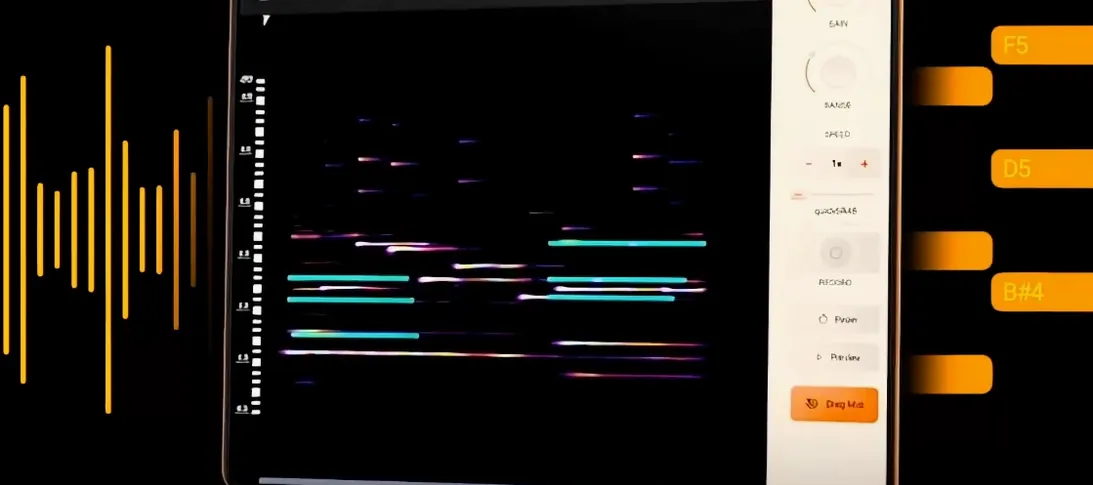
Drag-and-drop pitch detection sits at the center of noteGRABBER 2.0.0, the macOS plugin from Navie D that turns audio notes into MIDI data. It runs as a VST on Intel 64-bit and Apple Silicon machines, with macOS 10.12 as the floor, so older studio setups and current hardware are both covered. The developer describes the tool as a way to make sample-based beat creation faster.
Compatibility comes first here. The plugin loads inside any host that supports the VST format, and the single English-language interface keeps the analysis controls within reach. Once a sample is loaded, noteGRABBER reads the notes it contains and produces MIDI output that can drive other instruments.
That workflow points at two practical uses the developer names: developing musical ideas from a sample, and adding instruments over an existing piece of audio. A loop pulled from a record can become the basis for a bassline or a lead without manual transcription.
Version 2.0.0 arrives without a public changelog, but the core task remains audio analysis for beat production. For producers who already work inside a VST host on macOS, the plugin slots into an existing chain rather than demanding a separate editing environment.
How noteGRABBER slots into your production setup
noteGRABBER sits at a specific point in the signal chain: it needs audio, and it outputs MIDI. Drop it onto a track that already contains a sample—a drum break, a vocal phrase, a piano loop—and route its MIDI output to a fresh instrument track. That new track can host anything from a stock synth to a multi-gigabyte sample library. The plugin does not make sound on its own; it feeds notes to whatever comes next.
On the macOS side, the plugin works with any VST host that respects the format. Users running Logic Pro will need a VST-to-AU wrapper, since Logic speaks only Audio Units. Ableton Live, Bitwig, Reaper and FL Studio for Mac load it directly. The analysis engine does not touch the system audio driver—it reads the audio buffer inside the host, so routing in Sound Preferences or Audio MIDI Setup is unnecessary. MIDI output appears as a virtual source inside the DAW, ready to be picked up by another track's input selector.
A less obvious integration point is with the macOS Accessibility framework. Producers who rely on VoiceOver for navigating plug-in interfaces report that noteGRABBER's straightforward control set—a handful of buttons and sliders—works without the custom scripting some larger instruments demand. The developer has not published accessibility documentation, but the layout uses standard VST controls the system can read.
Silent MIDI output and the routing fix
A handful of issues surface regularly when producers first load noteGRABBER. The most frequent is silence: the plugin analyzes the sample but no MIDI reaches the destination track. This usually traces back to routing. In most DAWs, the MIDI output of one track must be manually assigned as the input of another. Open the destination track's input menu and select the noteGRABBER instance by name. If the host offers a "MIDI From" dropdown, check that it is not set to "All Ins" or a hardware controller by mistake.
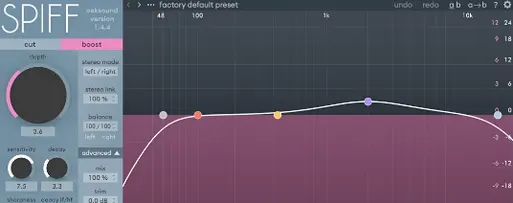
Another snag involves polyphonic material. noteGRABBER works best with monophonic sources—single-note basslines, lead vocals, horn stabs. Feeding it a full mix or a dense chord progression can produce a spray of ghost notes, particularly in the low end. The workaround is to use a high-pass filter before the plugin. Slice the sample to isolate the part you want analyzed, apply a gentle EQ cut below 150 Hz, and run the analysis again. The resulting MIDI will be cleaner.
Timing drift also comes up. The plugin analyzes audio offline—it processes the whole sample when you trigger analysis, not in real time. If the sample contains swing or a loose human performance, the detected note onsets may land slightly ahead of or behind the grid. Quantizing the MIDI output to the project tempo is a ten-second fix. Most DAWs offer a "Quantize" command that snaps notes to the nearest division while preserving the original durations. A sixteenth-note setting suits most hip-hop and electronic material.
On Apple Silicon machines running macOS Ventura or later, a few hosts require the plugin to be opened in Rosetta mode the first time it scans. This is a one-time step in the host's Get Info panel, not a permanent setting. Once validated, the native ARM build loads without issue on subsequent launches.
Users searching for notegrabber mac setups occasionally ask whether the plugin handles tempo detection alongside pitch. It does not—the analysis is pitch-only. For tempo mapping, pair it with a separate transient detector or use the host's own beat-marking tools before running the sample through noteGRABBER.
From sample to synth part: a walk-through
Here is a practical route from a raw audio loop to a finished arrangement using noteGRABBER, a DAW and a soft synth.
- Isolate the sample. Drag a two-bar melodic loop onto an audio track in your host. Trim the region so it starts cleanly on the downbeat. If the sample has drums or background noise, apply a band-pass filter to focus on the melodic range—roughly 200 Hz to 2 kHz works for most instruments.
- Load noteGRABBER. Insert the plugin on the same track as an insert effect. Open the interface and let it capture the audio. The analysis button reads the entire region and generates a MIDI clip.
- Route the MIDI. Create a new instrument track and load a synth—anything from a simple sine-wave patch to a sampled instrument. Set this track's MIDI input to the noteGRABBER output. Hit play. The synth should now follow the original melody.
- Clean the performance. Open the MIDI clip in the piano roll. Delete any stray notes below C2 or above C6—these are often harmonic artifacts. Quantize to sixteenth notes, then manually adjust any phrases that still feel rushed or lagging. Shortening note lengths by a few ticks can tighten up legato passages.
- Layer and vary. Duplicate the MIDI clip to a second instrument track. On the copy, shift all notes up an octave or change the patch to a pluck sound. Pan the two instruments slightly apart. The original sample provides texture underneath while the MIDI-driven layers carry the melodic weight forward.
The whole process—from dropping the sample to hearing a synthesized version—takes under two minutes once the routing becomes second nature. Producers who work regularly with notegrabber free download copies or builds from other sources follow a similar sequence, though the core analysis engine behaves identically across installations.
- macOS 10.12 or later
- Intel 64-bit or Apple Silicon Mac
- VST-compatible host
- Interface language: English
- Version
- 2.0.0
- Download
- 35 MB
- Developer
- Navie D
- Languages
- English
- Activation
- k'ed by BTCR
- Compatibility
- macOS 10.12 or later
- Architecture
- Apple Silicon, Intel 64-bit
Sign in or open a desk account to write a letter.
No letters on this brief yet. They are read before they run.







 Top
Top