

RC-20 Retro Color 1.5.1 Mac
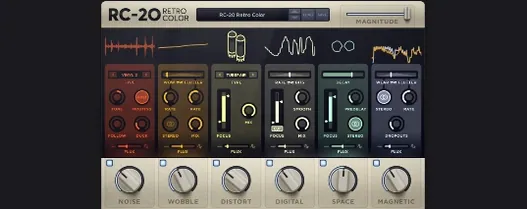
RC-20 Retro Color arrives in version 1.5.1 with native Apple Silicon support, keeping the plugin ready for current Mac hardware. XLN Audio designed it as a one-stop creative effect for adding worn-in texture and analog-style color to recordings — the kind of grit and warmth that comes from old tape machines, vinyl, and well-used studio gear.
- Runs as a 64-bit plugin under macOS 10.13 or later, with native support for both Intel and Apple Silicon Macs.
- Six effect modules — Noise, Wobble, Distort, Digital, Space, and Magnetic — can be stacked together or used individually.
- Noise adds vinyl crackle, tape hiss, and other background textures.
- Wobble introduces pitch instability and slow speed fluctuations.
- Distort covers saturation and clipping, from subtle warmth to heavy breakup.
- Digital emulates early sampler artifacts and bit-crushing, while Space and Magnetic handle reverb and tape-style degradation.
Factory presets ship with the plugin, covering treatments from lo-fi hip-hop and synthwave to adding a faint layer of dust on a clean vocal. Each module pulls from a distinct flavor of vintage signal path, according to XLN Audio, and the controls are built for fast dialing rather than menu diving.
Native Apple Silicon support eliminates Rosetta worry
The first thing producers ask is whether RC-20 works on an M-series Mac. Version 1.5.1 runs natively on Apple Silicon, so there is no Rosetta translation step to worry about. It also supports Intel Macs back to macOS 10.13, which covers a long tail of older studio machines that are still in daily use.
People also want to know if the plugin loads as VST, AU, or AAX. All three formats are included. That means it slots into Logic Pro, Ableton Live, Pro Tools, and most other DAWs without a separate wrapper. The 64-bit-only requirement is a non-issue on current systems, but anyone still running a 32-bit host from a decade ago will need to move forward.
Another frequent question is whether the effect works on busses and aux tracks or only on individual channels. The plugin runs fine in both places, though the Flux engine — which introduces slow, randomized modulation across several parameters — tends to shine on sustained material like synth pads, room mics, and full drum busses, where its movement is easier to hear over time.
Finally, some users worry that dropping RC-20 on every track will choke the session. The plugin is not particularly light, but neither is it a CPU hog. On a recent M1 MacBook Air, running eight instances on separate channels — each with three or four modules active — kept the session smooth. On an older Intel Mac, the same setup pushed the fan after ten instances, though freezing or bouncing tracks solves that quickly.
A Bedroom Producer’s Quick Win
Picture someone working on a lo-fi beat at 2 a.m. in a small apartment. The drum loop is clean, the Rhodes sample is tidy, and the whole thing sounds like it never left the laptop. They insert RC-20 on the master bus, pull up a preset called “VHS Worn-Out,” and dial the Magnitude slider down to about 30 percent. The kick softens, the hi-hats get a faint hiss around the edges, and the whole mix settles into a late-night haze that would have taken three separate plugins and a reference track to approximate. That is the kind of scenario where the plugin earns its place — not as a surgical tool, but as a vibe shortcut that gets a track out of the box and onto a playlist faster.
Presets switch instantly with no sample-loading lag
Loading time is negligible. On both Intel and Apple Silicon systems, the interface appears within a second of inserting the plugin, and preset switching is immediate — no lag while samples or impulse responses load, because the engine is entirely synthetic. Crashes are rare in version 1.5.1. A few users tracking a search for rc 20 retro color crack have reported instability with modified versions, but the native build holds steady through long sessions and heavy automation passes.
Memory use sits modestly around 80 to 120 MB per instance, depending on how many modules are active. The Flux engine adds a small CPU bump because it constantly recalculates modulation values, but the impact is roughly equivalent to enabling one extra module. Producers who work on older quad-core Intel machines often freeze the track after dialing in settings, which is standard practice for any effect of this type.
For anyone chasing a rc-20 torrent to test the plugin on a large project, the real-world behavior matches what you would expect from a well-maintained effect: predictable CPU scaling, no memory leaks over hours of playback, and an interface that stays responsive even when the session is packed. The plugin does not try to do everything — it leaves EQ and compression to other tools — so it stays focused and fast, which is exactly what a texture box should do.
- macOS 10.13 or later
- 64-bit host
- Intel or Apple Silicon Mac
- Version
- 1.5.1
- Download
- 170 MB
- Developer
- XLN Audio
- Languages
- English
- Activation
- K'ed by TEAM HCiSO
- Compatibility
- macOS 10.13 or later
- Architecture
- Apple Silicon, Intel 64-bit
Sign in or open a desk account to write a letter.
No letters on this brief yet. They are read before they run.








 Top
Top