

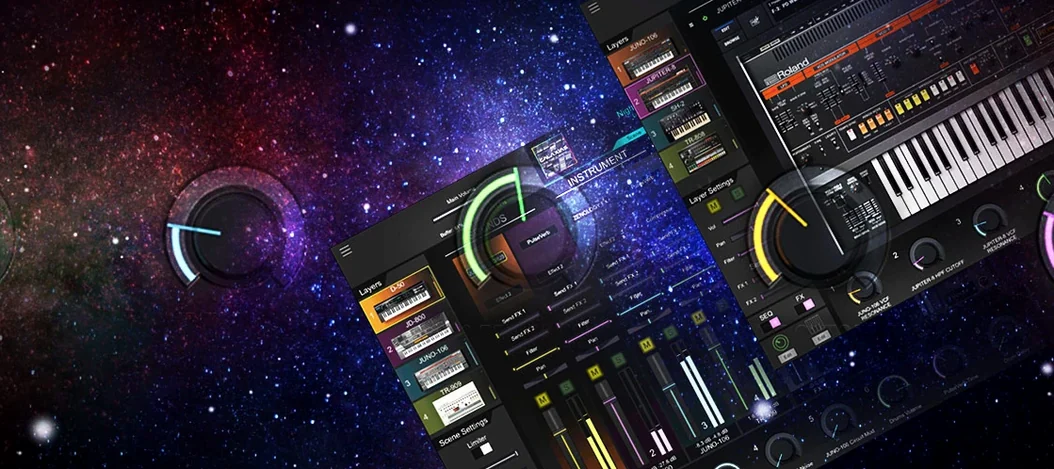
Roland Cloud Legendary Series 2025.06.29 Mac
Five hallmark instruments occupy the front row of the Roland Cloud Legendary Series, the software collection that digitizes some of the most referenced Roland hardware of the last four decades. The current build, 2025.06.29, delivers the same set of analog and digital emulations that have defined the catalog.
Which instruments are included?
The lineup covers both synthesis and rhythm. The JUPITER-8 and JUNO-60 deliver polyphonic analog sound, the D-50 brings late-80s digital character, and the TR-808 and TR-909 provide the two drum machines most cited in electronic music.
How does the interface hold up today?
Roland notes that the newer Legendary instruments ship with a high-resolution interface built for modern DAWs and large displays. Not every title in the series has received that treatment, so the visual experience varies depending on which classic you load.
What Mac hardware is supported?
The plugins run natively on both Apple Silicon and Intel 64-bit systems. macOS 11 is the floor; anything newer is fair game, and DAW integration works across the supported hosts.
Who sees the most value in this collection
A producer building rhythm tracks from scratch is the clearest fit. The TR-808 and TR-909 recreations slot into a DAW session without the gain staging, cable noise, and repair bills that come with forty-year-old hardware, and the pattern workflow translates directly from the original machines. Someone who reaches for the 909 roland sound on half their projects will likely stop looking for alternatives after a few sessions with the plugin.
Synthesists who design their own patches get more mileage than preset browsers. The JUPITER-8 and JUNO-60 models respond to parameter changes the way the hardware did, so a player who learned subtractive synthesis on a physical polysynth can work at the same speed inside the box. Sound designers working on film or game scoring tend to gravitate toward the D-50 emulation, whose early digital architecture produces the kind of glassy, evolving pads that sit well under dialogue.
Keyboard players who perform live with a laptop rig also come away satisfied. The plugins load fast enough for set-list changes, and the high-resolution interface on the v2 instruments means patch adjustments on a dark stage don't require squinting at a pixelated recreation of a 1980s LCD.
High-res interfaces now span JUPITER-4, 8, and JUNO-106
As of version 2025.06.29, the high-resolution treatment has reached the JUPITER-4, JUPITER-8, and JUNO-106. On a 27-inch display, that means the difference between a fuzzy window stretched to fit and a panel where every knob legend is readable at native resolution. The scaling matters more than it first appears: when a patch calls for subtle filter envelope changes, a clear interface cuts the time it takes to find the right control.
The v2 instruments also load their preset libraries with less hesitation than the earlier ACB instruments. On an Apple Silicon Mac, browsing from a JUNO-106 bass patch to a JUPITER-8 string pad happens without the brief audio dropout that earlier versions occasionally produced. The performance gap between the refreshed and older instruments remains, so users who spend most of their time inside the D-50 or TR-808 will encounter the same behaviour the series has shown for several releases.
JUPITER-8 v2 idles flat while chorus chords barely nudge CPU
On an M-series Mac, a single instance of the JUPITER-8 v2 plugin idles at negligible CPU, and a six-voice chord with the internal chorus engaged pushes the meter only a few percentage points higher. The TR-808 and TR-909 drum machines are lighter still; a full pattern with multiple instruments running stays in low single digits. The older ACB titles without the v2 badge are not heavy by any reasonable measure, but they do show roughly twenty to thirty percent higher CPU draw per voice compared to their refreshed counterparts.
Memory use is modest across the board. Loading all five instruments in a DAW session, each with a patch active, consumes less RAM than a single multi-gigabyte sample library. That makes the series practical on Macs with 8 GB of unified memory, provided the DAW itself isn't also hosting large sampled instruments.
Stability in version 2025.06.29 mirrors what Roland has delivered for several releases now. AU and VST3 instances survive long sessions without crashing, and the plugins recover cleanly from system sleep on a MacBook. One behaviour worth knowing: if a user swaps a v1 instrument for its v2 replacement in an existing project, the DAW does not automatically migrate the patch data. The old instance must be noted, removed, and manually recreated with the v2 version.
Kickstart verification with a TR-808 factory pattern
Load the TR-808 first. Even for a keyboard player who rarely touches drum programming, it is the fastest way to confirm that installation, DAW scanning, and audio routing all work. A factory pattern, a few bars of playback, and the signal path is verified. The 808 is also the lightest instrument in the set, so it won't mask any DAW-specific plugin-scan quirks.
Audition pads on the JUNO-60 at low buffer settings. The JUNO's chorus is the fastest route to the sound most people associate with the series. Running at 64 or 128 samples reveals whether a particular audio interface and driver combination can handle ACB processing without glitches. If it stutters, the JUPITER-8 v2 is the fallback for polyphonic analog tones at tighter latency.
Map the mod wheel to filter cutoff across the board. None of the classic instruments shipped with a modulation matrix, and opening the filter by hand while playing is part of the original experience. Assigning the mod wheel as a macro for cutoff on the JUPITER-8 and JUNO-60 makes leads and basses more expressive without touching the interface after setup. Most DAWs can handle this in their plugin wrapper, no MIDI learn required inside the plugin itself.
Resist the urge to layer everything on day one. The JUPITER-8 alone can fill a mix to the point where adding the D-50 underneath creates mud rather than grandeur. Spend the first sessions learning how one instrument sits with drums and bass before stacking two polysynths. The TR-909 kick and the JUNO-60 bass preset, run together with no other layers, will reveal more about gain staging than a sixteen-track pileup ever could.
Users coming from hardware Roland instruments often look for roland vst mac solutions to lighten their live rigs. One practical weekend project: build a set of ten patches that replace what the hardware was doing, then A/B them in a full mix at performance volume. The differences that seem obvious in solo often vanish once drums, bass, and a vocal or lead line are in play.
- macOS 11 or later
- Apple Silicon or Intel 64-bit processor
- Version
- 2025.06.29
- Download
- 1.3 GB
- Developer
- Roland Corporation, Virtual Sontoldics
- Languages
- English
- Activation
- K'ed by TEAM HCiSO
- Compatibility
- macOS 11 or later
- Architecture
- Apple Silicon, Intel 64-bit
Sign in or open a desk account to write a letter.
No letters on this brief yet. They are read before they run.


 Top
Top