


Roland ZENOLOGY Pro 2.0.7 Mac
Roland ZENOLOGY Pro 2.0.7 runs on Apple Silicon and Intel 64-bit Macs with macOS 11 and later. For anyone opening the plugin for the first time, the controls can look dense. The terms below map out what you land on immediately, so you can start shaping a sound without reading the manual front to back.
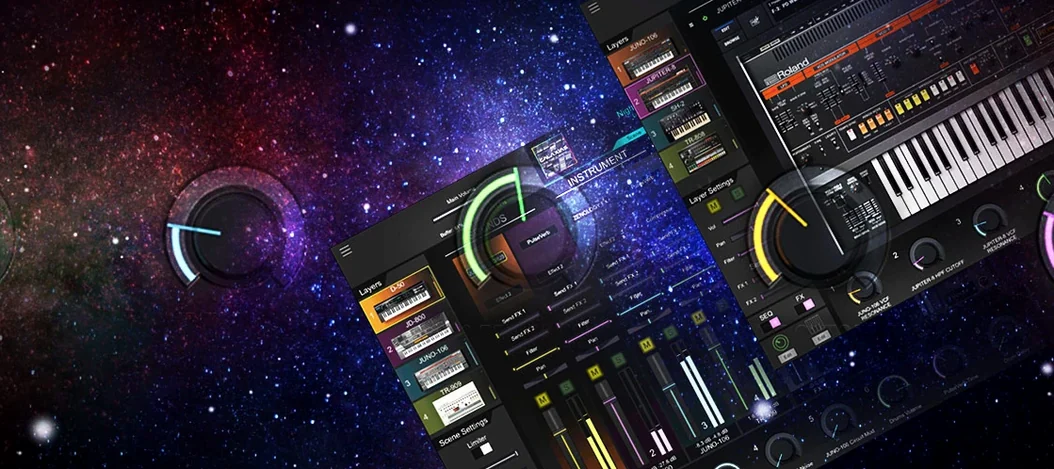
Tone — A single playable patch. The library ships with more than 4,000 of them, from basses and pads to evolving textures, all built on the ZEN-Core engine. Browse by category in the main panel and double-click to load one.
Partial — The basic voice element. Each tone stacks up to four partials. A partial can run one of nine oscillator types, including virtual analog, Supersaw, noise, PCM, and PCM SYNC. The PCM set draws from 1,840 waveforms, so a partial can sound like a saw wave or a sampled instrument depending on the choice.
LFO — A modulation source that moves a parameter over time. Eleven shapes are available, including stepped and random curves. Assign an LFO to filter cutoff or pitch for movement that a static envelope cannot give.
Drum Kit — A collection of percussion tones mapped across the keyboard. More than 200 kits are included, each built from the same partial structure as a tone. Load one to audition how ZEN-Core handles transient-heavy material.
Apple Silicon support: native on M1 and M2 Macs
Does ZENOLOGY Pro work on an M1 or M2 Mac, or is it Intel-only? The 2.0.7 build runs natively on Apple Silicon. The installer detects the architecture and places the correct component. Users on Mac Studio and MacBook Pro machines with M-series chips report the plugin loads without Rosetta translation.
What happens if the DAU cannot find the plugin after installation? The Audio Units component lands in the standard system folder. If Logic Pro or Ableton Live does not pick it up on the first scan, a quick reboot of the DAU usually forces a rescan. In rare cases on macOS Ventura and later, the system quarantines new components. Running xattr -cr on the component file in Terminal removes the flag and lets the host recognise it.
Do the Sound Packs and Wave Expansions from Roland Cloud work with this version? Yes. The tone browser reads installed expansions and merges them into the library. Any pack already downloaded shows up under the category tree after a library refresh. The total count can climb past 10,000 variations once the full catalog is loaded.
Is an internet connection required every time you open the plugin? The synth itself runs offline. The only time a connection matters is during initial setup of the Roland Cloud environment that manages content delivery. Once the sound data is on disk, the plugin plays back without phoning home.
A sound design task from start to finish: building a bass that cuts through a dense mix
Start with an empty tone. In the browser, right-click and choose to initialize a patch. The default layout loads a single partial with a saw wave, a low‑pass filter wide open, and a basic amplitude envelope.
For a bass that sits forward, switch the oscillator type to PCM SYNC. Scroll through the 1,840 waveforms and pick a synth bass sample with a sharp attack transient. Set the octave to -1 so the fundamental lands in the 40–80 Hz range.
Now head to the filter section. Select the JUPITER‑model low‑pass filter — its slope and resonance character add bite without thinning the low end. Pull the cutoff down to about 400 Hz and raise the resonance until you hear a slight ring at the knee. Key‑tracking at 50% keeps the tone consistent across the keyboard range.
Assign the first LFO to the filter cutoff. Choose the stepped random shape, set the rate to quarter‑note sync, and dial the depth to roughly 8%. The result is a subtle per‑note variation that stops the bass from sounding static on repeated hits.
Layer a second partial. Set it to a sine wave from the virtual analog options, tune it an octave below the first partial, and blend it in at about 40% volume. This reinforces the sub frequencies without muddying the attack. Enable the EQ on both partials and roll off everything below 30 Hz to keep headroom clean.
On the master effects chain, insert the onboard compressor with a medium attack and a 4:1 ratio. Follow it with a touch of tape‑style saturation from the effects rack — just enough to add harmonics around 200–400 Hz. Save the tone to a user bank and test it against a kick drum. Adjust the amplitude envelope decay if the tail clashes.
Silent plugin fix: match DAW and interface sample rates
Silent plugin on first load. The most frequent cause is a mismatch between the DAU sample rate and the audio interface. If ZENOLOGY Pro shows a loaded tone but produces no output, open the DAU audio settings and confirm the project rate matches the interface. Toggling the rate from 48 kHz to 44.1 kHz and back sometimes resets the audio stream.
High CPU spiking with multi‑partial patches. Each partial is effectively a full synthesizer voice. A four‑partial tone with per‑voice effects can tax a machine quickly. Users who hit the ceiling can reduce the polyphony per tone in the utility menu or freeze the track in the DAU. Switching off the second LFO on partials that do not use it saves a modest amount of cycles.
User banks disappearing between sessions. Custom banks live inside a database file. If the DAU crashes or the machine shuts down abruptly, the database can corrupt. Keeping a backup of the user tone folder is the simplest safeguard. The plugin also writes to a temporary cache; clearing it from the preferences folder forces a clean rebuild without losing saved tones.
Expansion packs not showing in the browser. After adding a Sound Pack through the Roland Cloud manager, the plugin needs a manual library refresh. The command sits in the tone browser under the gear menu. If the refresh does not pull them in, checking the content path in the plugin preferences usually reveals the mispointed folder.
Star 4,000-plus tones by instrument family before programming
Spend the first session auditioning, not programming. The 4,000‑plus tones are organised by instrument family and genre. Flick through ten or fifteen in each category and star the ones that catch your ear. After an hour you will have a shortlist of fifty go‑to patches, which is far more useful than trying to learn every parameter at once.
Resize the interface early. The window scales from compact to nearly full‑screen. On a 27‑inch display, the larger view spreads the oscillator, filter, and LFO panels across the width so you see all four partials side by side. On a laptop, the smaller size keeps the plugin from overtaking the screen.
Test the patch‑sharing workflow with a hardware unit if one sits in the studio. Save a tone from the plugin to a USB stick and load it into a JUPITER‑X or FANTOM. The round‑trip confirms that custom banks are formatted correctly and gives a preview of how sounds translate from software to hardware.
Keep an eye on the effects rack. More than 90 algorithms are available, and stacking three or four on a tone is easy. Early on, bypass them one at a time to hear what the raw partials are doing. A patch that sounds thin without effects probably needs oscillator work, not another chorus.
If you downloaded the plugin from a community source and need to understand how to crack ZENOLOGY on Mac, the simplest path is following the readme that ships with the patched installer. Most reports point to the Team V.R release as the version that activates cleanly on both Intel and Apple Silicon without additional kernel‑extension tinkering.
Hardware-style partials vs. Pigments' visual modulation
ZENOLOGY Pro versus Arturia Pigments. Pigments leans into a visual modulation workflow where every routing appears as a coloured line. ZENOLOGY Pro takes a more hardware‑style approach: the partial structure mirrors what a JUPITER‑X or FANTOM user sees, with less visual feedback but faster layering for those who already know subtractive synthesis. Where Pigments offers wavetable and granular engines, ZENOLOGY Pro counters with the PCM SYNC oscillator and the Roland effect catalog — a different set of timbres that suits producers chasing late‑80s through early‑2000s synth tones.
ZENOLOGY Pro versus u‑he Diva. Diva models specific analog circuits and sounds best when you push the accuracy setting high, which also pushes CPU usage. ZENOLOGY Pro does not attempt component‑level modeling. Instead it replicates the ZEN‑Core behaviour that powers Roland’s current hardware line. The trade‑off: Diva captures oscillator drift and filter saturation with more detail, but ZENOLOGY Pro runs four partials and a full effects chain on a single voice without choking a session. Users who found a ZENOLOGY Pro crack Mac package through community channels note that the CPU efficiency is one reason they keep it in their template alongside heavier emulations.
ZENOLOGY Pro versus Native Instruments Massive X. Massive X revolves around two wavetable oscillators and a deep modulation system with performers and trackers. ZENOLOGY Pro takes a broader approach: four partials that can each be a different synthesis type, plus the drum‑kit mode that Massive X does not attempt. The Roland browser also groups sounds by instrument category rather than by sound‑design attribute, which makes patch hunting feel closer to flipping through hardware presets. People who originally searched for rutracker zenology pro or zenology rutracker often do so after finding Massive X too focused on wavetable manipulation for their needs.
- macOS 11 or later
- Apple Silicon or Intel 64-bit processor
- Version
- 2.0.7
- Download
- 1.8 GB
- Developer
- Roland Cloud
- Languages
- English
- Activation
- k'ed by Team V.R
- Compatibility
- macOS 11 or later
- Architecture
- Apple Silicon, Intel 64-bit
Questions readers asked
ZENOLOGY Pro opens the full ZEN-Core editing architecture, letting you build and modify tones from the partial level, while the standard ZENOLOGY plugin presents the core sounds in a streamlined interface.
Sign in or open a desk account to write a letter.
No letters on this brief yet. They are read before they run.



 Top
Top