

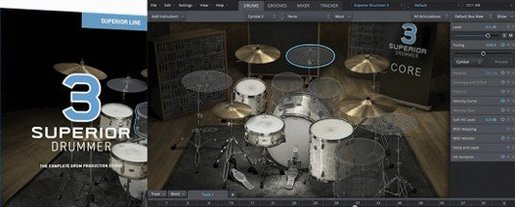
Superior Drummer 3.4.4 Mac
Recording a convincing drum track without a treated room, a collection of microphones, and a patient drummer has been the home producer's headache for decades. Toontrack's Superior Drummer 3 attacks that problem by placing a full multi-channel studio inside your DAW, where every snare buzz and cymbal overtone behaves like the real thing.
The software ships with seven complete kits recorded in world-class rooms, giving engineers raw, unprocessed sounds that sit properly in a mix. Rather than locking you into a single aesthetic, the library spans eras and genres. Audio-to-MIDI conversion is built in, so a tapped rhythm on a desk or a found percussion loop can become a searchable, editable performance without leaving the plug-in window.
Because the engine handles both acoustic realism and electronic layering, one session can move from brush-work jazz to layered industrial beats without switching tools. The virtual desk offers individual mic channels, bleed control, and routing that mirrors a hardware console. As of version 3.4.4, the platform runs natively on both Apple Silicon and Intel Macs, with High Sierra as the baseline, keeping latency low on modern machines.
The installer arrives as a standard disk image and a step-by-step setup, so deployment across a studio's machines is straightforward. When a riff needs drums that sound like a record rather than a plugin preset, the job this software solves is closing the gap between a quiet room and a pro tracking session.
Buffer size and engine tweaks that rescue a session
A fresh install of Superior Drummer 3 presents a working environment that is usable immediately, but a few adjustments make a disproportionate difference in daily sessions. The first stop should be the audio engine preferences, where the sample buffer size and disk streaming mode determine how the 230 GB library behaves under load. Setting the disk cache to accommodate the kits you reach for most often keeps playback snappy even when twenty other tracks are running.
Next, open the mixer view and disable the master bus limiter. The default signal chain includes a safety ceiling that protects monitors but masks the dynamic range of the raw room mics. With the limiter bypassed, the bleed channels and overheads breathe more naturally, and decisions about compression happen with ears rather than a hidden safety net.
Mapping the velocity curve to your controller or playing style prevents the common complaint that sampled drums feel stiff. The curve editor lives in the mapping window and lets you shift the response so that ghost notes on a snare trigger the softest layers while full strokes hit the rim-shot zone. Drummers coming from electronic kits benefit from adjusting the hi-hat pedal thresholds in the same panel; the default calibration assumes a generic controller and rarely matches a specific hardware pedal out of the box.
Multi-out routing and integration points on macOS
Superior Drummer 3 operates as a 64-bit Audio Unit, VST, or AAX plug-in, so it slots into Logic Pro, Ableton Live, Pro Tools, REAPER, and any host that expects a multi-output instrument. Routing each drum mic to a separate aux track in the DAW is a few clicks in the plug-in's mixer, after which a kick drum gets its own EQ and bus compression alongside bass guitar, while the snare top and bottom mics can be processed independently. The multi-channel architecture is the bridge between the virtual drum room and a real mixing workflow.
On macOS, the software takes advantage of Core Audio's aggregate device support. A producer running an interface for inputs and a separate high-end converter for outputs can configure the host to see both, then assign Superior Drummer's stereo master to the monitoring path while sending individual channels to outboard gear through the second device. Latency stays manageable because the native Apple Silicon build avoids the Rosetta translation layer entirely.
Drag-and-drop works in both directions. A groove from the built-in library can land as a MIDI region in the DAW timeline, and an audio loop from Finder can be dropped onto the audio-to-MIDI converter to generate a drum map in seconds. The plug-in also responds to standard MIDI program change messages, so a hardware sequencer or a MIDI foot controller can switch kits during a live performance without touching the mouse.
Building a drum performance from a vocal and guitar demo
Consider a songwriter who plays acoustic guitar and sings but has never sat behind a kit. She has a demo tracked to a click in GarageBand. The guitar part is solid, the vocal take has feeling, but the placeholder drum loop from a free sample pack flattens the whole arrangement.
She opens Superior Drummer 3 on the drum track and browses the library by tapping rhythms on her desk, using the laptop's built-in microphone as the audio input for the tap-to-MIDI converter. The software interprets her tapped kick-and-snare pattern and searches the groove library for matching performances played by session drummers. She finds a verse groove with a brushed snare and a chorus that opens into a heavy floor-tom pattern, drags both into the timeline, and has a full arrangement in under ten minutes.
Switching to the mixer, she rolls off the low end of the room mics to stop the acoustic guitar from fighting with the drum ambience, pushes the snare bottom mic for crack, and pulls the hi-hat bleed down in the tom channels. The track now sounds like a band tracking live, with drum dynamics that rise and fall with the song's structure. When the bridge needs a build-up, she uses the grid editor to add tom fills and a crash swell, then prints the stems for final mixing in Logic. The entire process happens inside a single plug-in window on a MacBook Air.
A stability update that ended crashes on Apple Silicon
The 3.4.4 update landed as a stability and compatibility release, but its practical effect for Mac users is that projects load without the unexpected quits that some Apple Silicon systems experienced under heavy track counts. The sample engine's disk access pattern was adjusted to reduce spikes when switching between kit pieces during playback, which matters most when programming fast tom fills across large libraries.
A more structural shift came with version 3.4.0, which established a new baseline for content compatibility. Any Superior Drummer 3 expansion released from the second quarter of 2025 onward requires at least 3.4.0, a detail that affects producers who tend to freeze their studio machines at older dot-releases. The change means that keeping the plug-in current is no longer optional if the plan includes future library additions, though the seven core kits remain accessible across all version 3 releases.
In everyday use, the most visible difference across the 3.4 cycle is the reduction in graphical lag when resizing the interface on Retina displays. Earlier builds stuttered when dragging the plug-in window to fill a large monitor; the current version scales smoothly, which speeds up the frequent back-and-forth between the grid editor and the mixer view during detailed drum programming sessions.
Toontrack issued Superior Drummer 3.4.4 as a maintenance release. Users planning to load Superior Drummer 3 sound expansions released from the second quarter of 2025 onward will need version 3.4.0 at minimum, as earlier builds lack the required compatibility layer.
- macOS 10.13 (High Sierra) or later
- 64-bit host application
- Intel or Apple Silicon processor
- Version
- 3.4.4
- Download
- 625 MB
- Developer
- Toontrack
- Languages
- English
- Activation
- k'ed by Team V.R
- Compatibility
- macOS 10.13 or later
- Architecture
- Apple Silicon, Intel 64-bit
Questions readers asked
Yes, version 3.4.4 includes native support for both ARM (Apple Silicon) and x86 architectures, and it requires macOS 10.13 or later with a 64-bit host.
Yes, the software can analyze drum audio recordings and convert them to MIDI data, allowing you to replace or layer sounds from the built-in library.
Sign in or open a desk account to write a letter.
No letters on this brief yet. They are read before they run.


 Top
Top