

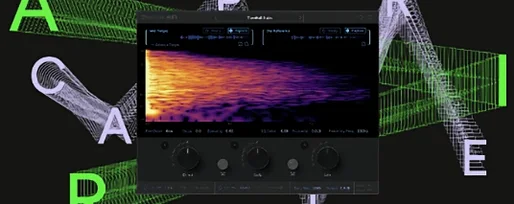
Supertone Air 1.0.1 Mac
Three plug-in formats, two Intel-native architectures, and one specific job: matching dialogue ambience. Supertone Air ships as AAX, VST3, and AU, running natively on Apple Silicon and Intel Macs back to macOS 10.13. It accepts 44.1 kHz, 48 kHz, and 96 kHz session sample rates.
- Insert Air on the ADR clip that needs to match the location sound.
- Find a short section of the production dialogue where only the room tone and ambience are present. Capture that as the reference.
- Air’s Acoustic Scene Transfer engine — built on neural networks — analyzes the reference and applies a combined reverb and EQ profile to the studio-recorded line.
- Adjust the direct, early, and late reflection controls to fine-tune how the voice sits against the background. The plug-in is not a static convolution reverb; the matching updates as you shift the balance between reflection stages.
According to Supertone, the tool was designed specifically to speed up ADR workflows where engineers previously stacked EQs and reverbs by ear. By targeting the acoustic signature rather than a generic hall or room preset, Air aims to cut the time between recording a replacement line and hearing it sit plausibly in the scene.
Taming a windy beach scene with shipping-container acoustics
A dialogue editor pulls up a scene from a drama shot on a windy beach. The boom track carries gusts, distant surf, and a hollow quality from the actor standing between two shipping containers. ADR was recorded weeks later in a dead booth. The new line is clean but sounds like it belongs in a podcast, not on sand.
First, she selects two seconds of room tone from the original location audio — no words, just the container resonance and the low rush of wind. That clip feeds into Air as the reference. She trims it tightly; the neural network works best with a pure ambience sample, not a syllable tail.
On the ADR clip, she inserts Air via AudioSuite and clicks capture. The plug-in takes roughly a second to build a profile. The result is immediate: the voice gains a metallic edge at 400 Hz and a diffuse tail that matches the container reflection. It is close, but the actor now sounds five feet from the camera when the original placement was closer.
She nudges the direct signal up by 2 dB and pulls the early reflections down slightly. The proximity control — a slider that shifts the perceived distance — moves from “far” toward “near” until the voice sits at the right depth. The late reflections get a small decay boost to keep the spaciousness without clouding consonants.
A quick A/B against the production line confirms the match. What took fifteen minutes of EQ sweeps and reverb tweaking last season now wraps in under two minutes. She exports the Air profile for the next scene and moves on.
Why a stray consonant in your reference sabotages the room match
The most common stumble is capturing a reference that contains dialogue. Even a faint consonant at the edge of the selection confuses the analysis, and the resulting profile applies vocal timbre to the ADR instead of room tone. Always audition the reference in solo; if you hear a plosive or a tongue click, trim tighter.
Another mistake is treating Air like a traditional reverb send. The plug-in works offline and expects to process the dry clip directly. Rookies who insert it on an aux track and bus signal to it get nothing usable — the engine needs the full dry signal in the processing chain, not a blend.
Applying the match at default settings and calling it done is also a trap. The capture provides a starting point, but the direct, early, and late reflection sliders exist because no two ADR performances land exactly where the location actor stood. Skipping the fine-tuning leaves the voice floating in the right room but at the wrong distance.
Some users capture a reference from a scene with wildly different background noise — like grabbing ambience from a quiet interior to match dialogue from a busy street. Air matches the acoustic space, not the noise floor. The neural network cannot replicate traffic or crowd walla; it models the reverberant signature of the environment, and a mismatched noise bed will still betray the edit.
Sculpting presence and first bounces with direct, early, and late sliders
The three reflection stage sliders — direct, early, and late — control how the captured space wraps around the voice. Direct level sets the presence of the dry signal; early reflections define the first bounces off nearby surfaces; late reflections govern the diffuse tail. For a close-miked interior scene, push direct up and pull late reflections back. For a wide shot in a warehouse, do the opposite.
The decay control scales the reverb tail length without altering the tonal character of the space. Shortening decay helps when the location had a long ring but the ADR line is fast and percussive. Lengthening it can glue a soft delivery into a cavernous backdrop.
Damping adjusts how the high frequencies roll off in the reflections. A dialogue editor working on a scene set in a carpeted living room should add damping to absorb the top end; a tile bathroom calls for less. The control responds in real time, so sliding it while looping a phrase reveals the sweet spot quickly.
The proximity slider deserves immediate attention on every capture. It shifts the perceived distance of the speaker within the captured space, and small moves — half a decibel or less — can pull a voice from the background into the foreground without touching the fader.
Turning dozens of daily ADR match jobs from minutes into seconds
Dialogue editors carrying heavy ADR loads see the biggest return. A series with five actors, multiple locations per episode, and tight turnaround means dozens of match jobs per day. Cutting that from minutes to seconds per line changes the shape of a post schedule. The ability to save and recall Air profiles across sessions also means a recurring set — like a police precinct or a starship bridge — needs capturing only once.
Re-recording mixers working on independent films benefit when the budget did not stretch to a full ADR stage with matching reverb chains. Air lets them process replacement lines in the box with a consistency that manual EQ-and-reverb stacking rarely achieves on the first pass. The offline workflow fits naturally into a premix stage where dialogue is cleaned and matched before the final mix.
Sound designers who build spaces from scratch use the WAV export feature differently. They capture an interesting room from a location recording, export the acoustic signature as audio, and drop it into a convolution reverb for sound design. Air becomes a profiling tool that feeds other parts of the session.
Music producers chasing vocal textures have started pulling profiles from film dialogue and applying them to sung phrases — a technique that surfaces on forums discussing supertone clear mac workflows. The result is not naturalistic, but it creates a vocal reverb that carries the fingerprint of a specific recorded space, something a generic hall preset cannot replicate.
Version 1.0.1 corrects an installation conflict that affected users who had Sound Particles Air installed on the same system. The plug-in file name was also changed from Air to Supertone Air to prevent future collisions.
- macOS 10.13 or later
- Apple Silicon or Intel processor
- Supports 44.1 kHz, 48 kHz, and 96 kHz sample rates
- Version
- 1.0.1 [GUISEPPE]
- Download
- 408 MB
- Developer
- Supertone
- Languages
- English
- Activation
- K'ed by MORiA
- Compatibility
- macOS 10.13 or later
- Architecture
- Apple Silicon, Intel 64-bit
Questions readers asked
Supertone Air is available as AAX, VST3, and AU plug-ins.
The plug-in supports 44.1 kHz, 48 kHz, and 96 kHz sample rates.
Sign in or open a desk account to write a letter.
No letters on this brief yet. They are read before they run.


 Top
Top