

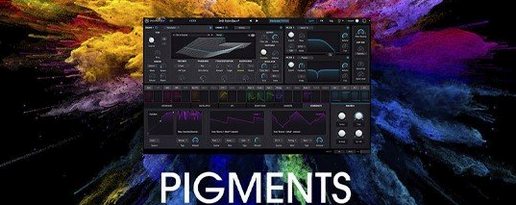
Arturia Pigments 7.0.1-6772 Mac
Sound designers and electronic producers reach for Arturia Pigments when a track needs a part that evolves over time. In a typical session, it sits on a software instrument track, often handling pads that shift texture between verse and chorus, or basslines that warp from clean sub to brittle distortion. Its dual-engine architecture means you can layer a wavetable sweep against a warm analog-modeled oscillator, then push both through the onboard effects chain without leaving the plugin window.
On a bus, Pigments works as a source for resampling. A producer might print a four-bar generative sequence—the sequencer spits out unpredictable melodic patterns—then chop the audio and feed it back into a sampler on another track. The drag-and-drop modulation system speeds this up: dragging an LFO onto a filter cutoff or a reverb mix control takes a single gesture, which matters when an idea is running hot.
The version 7.0.1 update refines the front-end experience with a redesigned Play Page, putting macro controls and preset browsing closer to the surface. New Rage, Ripple, and Reverb filters join the Corroder effect, giving mix engineers more destructive tools to send a polite pad into degraded, speaker-cone territory. In-app tutorials lower the barrier for an assistant engineer or an intern who needs to dial in a sound quickly while the clock is running.
Because it supports Apple Silicon and Intel 64-bit Macs running macOS 11 and up, Pigments slots into studios that mix old and new hardware without friction. The color-coded interface helps when you are scanning a dozen instances across a large arrangement, making it easier to spot which track holds the synth doing the heavy lifting.
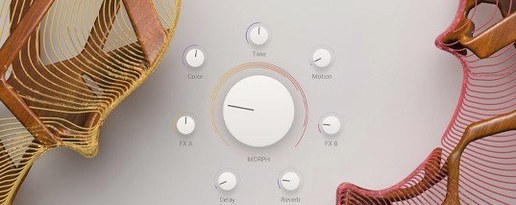
Landing on the play page with four pre-mapped macros
Start by loading an instance on an empty instrument track. The redesigned Play Page opens first — four macro sliders sit across the top, each mapped to something useful in the preset you land on. Tap through a few factory sounds with the arrow keys. The browser responds fast enough that you do not lose the thread of an idea.
Pick a pluck that feels close. Switch to the synth view by clicking the tab. Engine 1 runs a wavetable oscillator; Engine 2 sits silent. Turn on Engine 2, set it to analog mode, detune it by seven cents, and blend the fader to about thirty percent. The sound thickens immediately. Drag the unison voice count on Engine 1 up to four and spread the stereo field. Now the pluck has width and a slight chorusing effect without touching a modulation effect.
Modulation comes next. Grab an LFO from the panel on the left and drop it onto the filter cutoff of Engine 1. A routing line appears. Set the LFO shape to a ramping sawtooth and sync it to a dotted eighth note. The filter now opens rhythmically. Drag a second modulator — an envelope this time — onto the wavetable position of Engine 1. Adjust the attack to taste. The timbre shifts across the duration of each note, so held chords never sound static.
Move to the effects section. Insert the new Corroder at the end of the chain. Dial the crush parameter slowly while holding a chord; somewhere around forty percent the top end crumbles into a grainy haze that still carries pitch. Push it further and the sound collapses into lo-fi territory. Back it off to twenty-five percent and add a touch of the Ripple filter afterward to smooth the harsh edges with a resonant peak. Print the part to audio. The whole process takes under five minutes.
For generative ideas, open the sequencer tab. Set it to arpeggiator mode, lock the scale to D minor, and randomize the order. Hit record in the DAW and let it run for sixteen bars. The sequencer throws out patterns you would not program by hand. Slice the resulting clip, keep the best four bars, and drag the MIDI back into the arrangement for further editing.
Native Apple Silicon support skips Rosetta entirely
Does it run natively on Apple Silicon? Yes. The current build is a universal binary, so it loads without Rosetta translation on M-series Macs. Plugin validation in Logic Pro and Ableton Live passes without issue on macOS 11 and later.
How heavy is the CPU load? It depends on voice count and effects. A single instance playing four-note chords with unison at four voices and two engines active sits around fifteen to twenty percent on an M1 chip. Stacking the Corroder, a heavy reverb, and the granular engine pushes that higher. Freezing tracks is routine in dense projects, same as with any deep synth.
Will it open my old Pigments patches? Projects saved with earlier versions of Pigments load presets and parameter states without manual migration. The patch format remains forward-compatible through the 7.x cycle.
Can I use Pigments without a MIDI controller? Yes, though a controller speeds things up. The Play Page macros respond to MIDI learn with a right-click, and the mod wheel is pre-mapped on most presets. If you work purely with a mouse, the drag-and-drop modulation system still keeps routing quick.
Is it just for electronic music? No. Film composers use it for textural beds and tension cues; pop producers lean on the analog engine for bass and keys. The sample engine can load orchestral one-shots, and the granular mode turns them into evolving pads that sit well under dialogue.
How Pigments fits with other tools
Pigments loads as an AU, VST3, or AAX plugin, so it drops into Logic Pro, Ableton Live, Bitwig, Cubase, and Pro Tools without extra wrappers. In a typical setup, it runs alongside Arturia's own Analog Lab for preset browsing, but the two serve different roles: Analog Lab is a preset player, while Pigments is the full editor where sounds get built from scratch.
The plugin sends and receives MIDI, meaning you can route its sequencer or arpeggiator output to another instrument track. Producers sometimes use Pigments solely as a MIDI generator, feeding its generative patterns into a hardware synth via a MIDI interface. The drag-and-drop modulation assignments translate to automation lanes in the DAW; right-click any modulated parameter and choose "show automation" to draw curves directly in the arrange window.
With macOS Audio Unit hosting, Pigments runs inside other plugins that support AU instruments, like Blue Cat's PatchWork or DDMF Metaplugin. This lets you build multi-synth racks where Pigments handles one layer and another synth covers a different frequency range, all inside a single plugin slot. For resampling workflows, printing Pigments to audio and dragging the clip into a sampler track in the same DAW keeps the whole process on one screen.
The color-coded interface aligns with how many DAWs color their tracks. Set a track to purple in Logic, and the Pigments window carries the same visual cue in its headers, making it easier to navigate a session with twenty-plus tracks.
Run the standalone app first to fix a missing plugin
The plugin fails validation or does not appear in the DAW. After installation, run the standalone application first. It performs a one-time scan and registers the plugin components. Then restart the DAW and re-scan. On Apple Silicon Macs, make sure the DAW itself is not running under Rosetta if you want the native ARM version to load.
Presets sound different from the preview. The audition preview in the browser plays a short MIDI phrase with built-in reverb and dynamics. When you load the preset, your MIDI input and track settings affect the output. Adjust velocity response and key range to match the preview's context.
High CPU spikes with the granular engine. The granular engine processes audio in real time and can spike when grain density is high. Lower the number of grains or reduce the engine's polyphony in the voice settings. Bouncing the track to audio early in the production process avoids surprises during mixing.
Modulation routings disappear after updating. The 7.0.1 update preserves all modulation assignments from earlier versions, but if a project references third-party modulators or MIDI mappings, those may need re-linking. Open the modulation matrix and check for any broken assignments marked in gray.
Some users looking for an arturia pigments torrent or a pigments vst crack find incomplete uploads. Incomplete downloads often miss the sound library, which lives in a separate folder from the plugin binary. Without it, Pigments opens but shows empty preset slots and silent engines. Moving the library folder to the correct location — typically /Library/Arturia/Pigments — resolves the missing content. A pigments 7 mac torrent that omits the sample pack leaves the granular and sample engines non-functional. The factory content totals several gigabytes; a properly assembled package includes wavetables, samples, and noise files alongside the installer.
Arturia Pigments 7.0.1 introduces a redesigned Play Page alongside three new filters—Rage, Ripple, and Reverb—and the Corroder effect. The update also supplies 150 factory presets, 50 wavetables, 30 samples, and 20 noises, plus in-app tutorials.
- macOS 11 or later
- Apple Silicon or Intel 64-bit processor
- Version
- 7.0.1-6772
- Download
- 1.8 GB
- Developer
- Arturia
- Languages
- English
- Activation
- K'ed by MORiA
- Compatibility
- macOS 11 or later
- Architecture
- Apple Silicon, Intel 64-bit
Sign in or open a desk account to write a letter.
No letters on this brief yet. They are read before they run.


 Top
Top