

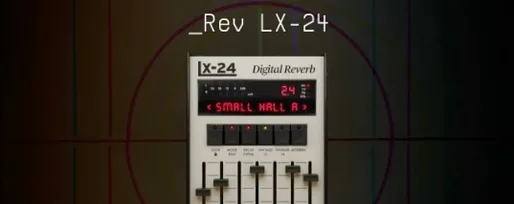
Arturia Rev LX-24 1.2.1-6567 Mac
Arturia updated the macOS build of Rev LX-24 to version 1.2.1.6567, keeping the plugin current on Apple Silicon and Intel Macs running macOS 11 or later. The core remains an enhanced virtual replica of a vintage digital reverb, modeled on the Lexicon 224.
Where it works in a mix
Rev LX-24 earns its keep on aux sends and effect buses, where its dynamic tools do more than add space. Ducking reins in the reverb tail when the dry signal is present, keeping vocals and lead lines articulate. A gate tightens drum room sounds or creates that abrupt, gated-ambience effect on snares. The tremolo section modulates the wet signal, pushing a pad or guitar wash into rhythmic territory without extra routing.
Quick jobs for common sources
On a lead vocal bus, enable ducking and let the plugin detect the incoming signal level to pull back decay automatically. For a drum room send, switch to the modern converter mode for a cleaner tail, then dial in the gate to shape the sustain. Guitars and synths benefit from the 100 included presets as starting points; the decay adjusts according to the signal characteristics, so a busy arpeggio gets a shorter bloom than a held chord.
Fixing a blank visualizer under Rosetta on Apple Silicon
A handful of repeat issues show up in user forums. The most frequent is a blank or unresponsive visualizer on Apple Silicon Macs when the plugin loads in a DAW still running under Rosetta. Switching the host to native ARM or forcing the plugin to open in the same architecture as the DAW nearly always resolves it. Arturia's own documentation flags this in the included installation instructions.
Another sticking point is preset recall after updating. If the plugin ships with a new factory bank, some DAWs continue pointing to the older library until the user manually rescans or deletes the plugin cache. On Logic Pro, trashing the Audio Unit cache file and restarting the host brings the updated preset list back.
Latency spikes during tracking with ducking enabled are common enough to note. The ducking circuit analyzes the incoming signal in real time, which adds a small processing hit. For recording, most engineers bypass the plugin or route it to an aux track rather than an insert, then re-enable ducking at mixdown.
Dropping 10–12 instances without CPU spikes
Rev LX-24 loads quickly, even on older Intel machines. Session open times with 10–12 instances spread across aux tracks stay within a comfortable range, and the plugin rarely triggers CPU spikes above 4–5% per instance on a modern Apple Silicon chip. The modern converter mode shaves a fraction of the processing load compared to the vintage modeling path, though the difference is marginal in practice.
Stability holds up across long mixing sessions. Crashes tied directly to the plugin are infrequent in Logic Pro, Ableton Live and Cubase, though some users report occasional graphic glitches when the interactive visualizer runs alongside other GPU-heavy plugins. Minimizing and reopening the plugin window clears the artifact without restarting the host.
Shift‑drag the reverb tail to tweak decay and damping at once
The interactive visualizer doubles as a shortcut hub. Clicking and dragging directly on the reverb tail graphic adjusts decay and damping simultaneously, which is faster than dialing in separate knob movements. Holding Shift constrains the adjustment to a single parameter, though the documentation barely mentions it.
The dry/wet control operates as a single fader, but right-clicking it reveals a secondary balance mode that splits the signal path into independent level trims. A few producers working with stems have started using this to print wet-only returns without reconfiguring their send routing.
Preset browsing rewards keyboard shortcuts. The arrow keys step through the 100 presets while a track plays, making it practical to audition reverbs in context. Pressing the spacebar toggles the current preset on and off for quick A/B comparisons, a feature that appeared in the 1.2.1-6567 build and often goes unnoticed until someone stumbles across it.
The macOS build was updated to version 1.2.1.6567. The release maintains compatibility with current Apple Silicon and Intel systems.
- macOS 11.0 or later
- Apple Silicon and Intel 64-bit support
- Interface in English
- Version
- 1.2.1-6567
- Download
- 403 MB
- Developer
- Arturia
- Languages
- English
- Activation
- K'ed by MORiA
- Compatibility
- macOS 11 or later
- Architecture
- Apple Silicon, Intel 64-bit
Questions readers asked
Yes, it provides ducking, a gate, and a tremolo, each working on the wet signal for dynamic, rhythmic shaping.
Sign in or open a desk account to write a letter.
No letters on this brief yet. They are read before they run.


 Top
Top