

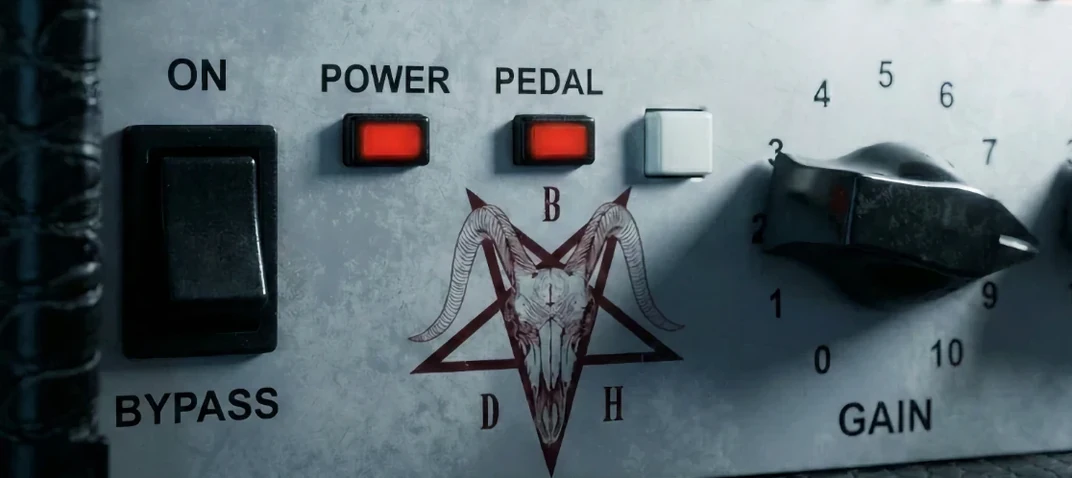
Bogren Digital Ampknob BDH 66o6 Plus 1.2.118 Mac
Tracking guitarists and mixing engineers reach for the Ampknob BDH 66o6 Plus when a session calls for an American-voiced amp that cuts without crowding the arrangement. The plugin, sound-designed by Jens Bogren, trades deep editing menus for a single character switch and a pedal toggle—decisions that happen fast while the transport is rolling.
Tracking rhythm guitars
Drop it on a mono or stereo guitar track to push a restrained, tight crunch forward. Flipping the main switch moves the tone into saturated, energetic territory that stacks well in double-tracked parts.
Shaping a mid-focused clean bus
Place it on a bus and feed it a DI signal or a recorded stem for a clean sound with a pronounced midrange character. The pedal switch adds a push that works for arpeggiated parts and chorused cleans without needing a separate boost plugin.
Adding energy to a printed stem
Insert it after a cabinet loader or channel strip to give a flat recorded guitar more presence and energy. The simplified control set keeps the focus on the source material, not on the plugin window.
Option-drag instantly centers the character knob
Holding the Option key while dragging the character switch snaps it to its midpoint, a small touch that saves fussing with fine mouse movements when you want an equal blend of the two voicings. Double-clicking the knob returns it to its default position, which is handy after a long tweaking session.
The pedal circuit can be toggled from a keyboard shortcut if your DAW supports MIDI learn or key mapping for plugin parameters. Assigning it to a footswitch lets you punch the boost in and out during a performance without lifting your hands from the guitar, something the front-panel toggle alone doesn't hint at. The gain staging also responds to input level in a predictable way: feeding it a hotter signal pushes the saturation harder, so you can treat the amp block like a pedal-platform amp without stacking extra gain plugins before it.
Harshness often starts at the output stage, not the amp
A common slip is setting the output too high and blaming the plugin for harshness that is actually downstream clipping. The BDH 66o6 Plus can output a strong signal, and if the next insert is a compressor or channel strip with a low headroom ceiling, the result gets fizzy fast. Checking levels at the plugin output meter—not just the DAW fader—clears this up quickly.
Some players expect the pedal switch to behave like an overdrive stompbox in front of a clean amp. It is more of a push circuit tailored to the amp's own voice, so driving it hard into an already saturated setting can create a compressed, flattened tone rather than more aggression. Backing off the main character knob before engaging the pedal usually delivers the energy boost people are after. Another recurring snag is running the plugin in stereo on a mono-recorded DI track and wondering why the stereo width controls in the next insert behave oddly; keeping the track mono until after the cab stage keeps the imaging predictable.
Silence after an update usually means a blocked license file
When the plugin loads with no sound, the cause is almost always a missing or deactivated license file after a system update. The installer is a standard package, but macOS security prompts can silently block the activation component. Re-running the included installation instructions and checking that the component appears in the host's plugin manager resolves this in most cases.
Latency complaints usually trace back to the DAW's buffer size, not the plugin itself, but switching to a lower buffer during tracking and raising it for mixdown is the standard fix. If the tone feels thin on a re-amped DI, the input gain staging into the plugin might be too conservative; nudging the clip gain up on the audio region before it hits the BDH 66o6 Plus often restores the weight people hear in demo sessions. Users searching for additional configuration tips sometimes look for an ampknob bdm download or an ampknob bdm torrent to cross-check behavior across builds, but the signal flow inside the plugin remains consistent.
- macOS 10.13 or later
- Apple Silicon or Intel 64-bit processor
- Version
- 1.2.118
- Download
- 253 MB
- Developer
- Bogren Digital
- Languages
- English
- Activation
- K'ed by MORiA
- Compatibility
- macOS 10.13 or later
- Architecture
- Apple Silicon, Intel 64-bit
Sign in or open a desk account to write a letter.
No letters on this brief yet. They are read before they run.



 Top
Top